Qmapi Developer Documentation
Welcome to the comprehensive guide for integrating Qmapi into your applications. This documentation provides detailed instructions for setup, configuration, and API usage to help you get started quickly and efficiently.
Overview
Qmapi is a powerful API solution designed to streamline survey operations through an efficient observer-based configuration system. Our platform provides robust integration capabilities for survey management and data collection, enabling developers to build sophisticated survey applications with ease.
High Performance
Optimized for speed and reliability
Secure
Enterprise-grade security features
Installation
Update System Packages
sudo apt update
sudo apt upgradeInstall Node.js and npm
sudo apt install nodejs
sudo apt install npmVerify Installation
node --version
npm --version
Configuration
Please fill in the following details in the .env.env file and send it back to us.
# API Keys

SUPPLIER_API_KEY=Your_Supplier_API_Key_Here
SUPPLIER_HASH_KEY=Your_Supplier_Hash_Key_Here
SUPPLIER_SUPPLY_CODE=Your_Supplier_Supply_Code_Here

# Database Configuration
DB_USER=Your_DB_User_Here
DB_PASSWORD=Your_DB_Password_Here
DB_NAME=Your_DB_Name_Here
DB_HOST=Your_DB_Host_Here
DB_PORT=Your_DB_Port_Here


# Connection Pool Settings
DB_POOL_MAX=Your_DB_Pool_Max_Here
DB_POOL_MIN=Your_DB_Pool_Min_Here
DB_POOL_ACQUIRE=Your_DB_Pool_Acquire_Here
DB_POOL_IDLE=Your_DB_Pool_Idle_Here
DB_POOL_LOGGING=Your_DB_Pool_Logging_Setting_Here
You have to make one subdomain and host them in your server
Environment Variables
Configure your environment variables using the following reference table:
| Variable | Description |
|---|---|
| QMAPI_API_KEY | Your Qmapi API key for authentication with the platform |
| SUPPLIER_API_KEY | API key for supplier service integration and access |
| SUPPLIER_HASH_KEY | Hash key used for supplier data encryption and verification |
| SUPPLIER_SUPPLY_CODE | Unique identifier code for the supplier service |
| DB_USER | Username for database authentication |
| DB_PASSWORD | Password for database authentication |
| DB_NAME | Name of the database to connect to |
| DB_HOST | Hostname or IP address of the database server |
| DB_PORT | Port number for database connection (e.g., 5432 for PostgreSQL) |
| DB_DIALECT | Database type (e.g., postgres, mysql, mariadb) |
| DB_LOGGING | Enable/disable SQL query logging (true/false) |
| DB_POOL_MAX | Maximum number of database connections in the pool |
| DB_POOL_MIN | Minimum number of database connections to maintain in the pool |
| DB_POOL_ACQUIRE | Maximum time (ms) that pool will try to get connection before throwing error |
| DB_POOL_IDLE | Maximum time (ms) that a connection can be idle before being released |
| DB_POOL_LOGGING | Enable/disable connection pool activity logging (true/false) |
Survey API
Use the following endpoint to retrieve active surveys:
GET https://api.qmapi.com/api/v2/survey

                    // Example Response
                    {
                        "survey_id": 60920424,
                        "loi": 20,
                        "ir": 20,
                        "cpi": 4.2,
                        "livelink": "https://api.qmapi.com/api/v2/survey/redirect/60920424?SupplyID=[%SupplyID%]&PNID=[%AID%]&SessionID=[%sessionID%]&TID=[%TokenID%]"
                    }
Here are some Query Parameters
You can add query parameters to the base URL https://api.qmapi.com/api/v1/survey to filter surveys based on specific criteria. These parameters include limit which defaults to 200 but can be adjusted as needed, and country where you can use IN for India or US for the United States. Additionally, you can filter by exactcpi, loi, and ir. By specifying these parameters, you can refine the survey results to better suit your requirements.
limit:- https://api.qmapi.com/api/v1/survey?limit={}country:- https://api.qmapi.com/api/v1/survey?country={}exactcpi:- https://api.qmapi.com/api/v1/survey?exactcpi={}loi:- https://api.qmapi.com/api/v1/survey?loi={}ir:- https://api.qmapi.com/api/v1/survey?ir={}Security Hashing
This API uses the following security measures:
- livelink:- https://api.qmapi.com/api/v2/survey/redirect/59722755?SupplyID=[%SupplyID%]&PNID=[%AID%]&SessionID=[%sessionID%]&TID=[%TokenID%]"
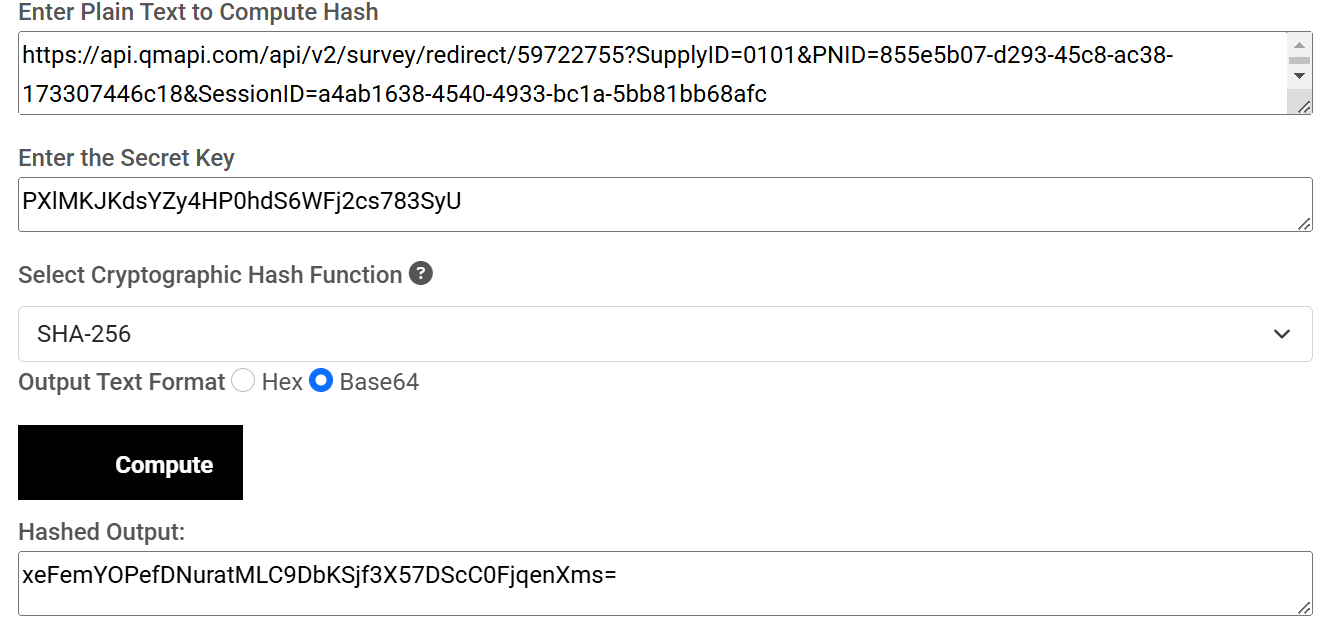 Then, encode this Hashed value to use .replace('+', '%2B').replace('/', '%2F').replace('=', '%3D') and retrieve the token value(TID)."
After Replacement, you will get the below value, Now Put Below value in the Takone Value(TID).
Then, encode this Hashed value to use .replace('+', '%2B').replace('/', '%2F').replace('=', '%3D') and retrieve the token value(TID)."
After Replacement, you will get the below value, Now Put Below value in the Takone Value(TID).

- This is the final URL

Need Help?
Our support team is ready to assist you with any questions or issues you may encounter during integration.